
Modern mobile players expect seamless responsiveness, quick load times, and an interface that operates smoothly with one hand. The 8IN app ecosystem was developed from the ground up to satisfy these specific demands for smartphone users across India. Whether you prefer running the platform inside your mobile browser or installing the standalone Android APK, this guide provides an exhaustive walkthrough of mobile features, layout navigation, and performance optimization.
If you are looking for direct installation instructions, jump over to our companion 8IN download guide, or consult our broader 8IN mobile platform overview for quick feature summaries.
Mobile-First Design Architecture of 8IN
Unlike desktop gaming websites that are retrofitted into mobile screens as an afterthought, 8IN features a native mobile-first layout. When viewing authentic platform screenshots, several ergonomic design choices stand out immediately:
- Vertical Aspect Ratio (9:19.5): All game tiles, banners, and modals are structured to fill modern smartphone screens without horizontal overflow or awkward clipping.
- Thumb-Zone Placement: Critical interactive elements—such as category tabs on the left, primary action buttons, and the bottom navigation bar—are positioned within easy reach of the player's thumb.
- Dark Mode Optimization: The dark carbon background with gold and saffron accents not only delivers a premium gaming aesthetic but also conserves battery life on AMOLED mobile displays.
To inspect the game titles accessible through this interface, read our thorough 8IN games platform guide or explore our analysis in the 8IN game category overview.
Mobile Browser (PWA) vs Native Android APK
Users frequently ask whether they should install the APK file or continue playing through a web browser. Here is an objective comparison based on our platform audit:
| Feature | Mobile Browser (Chrome / Safari) | Android APK Application |
|---|---|---|
| Installation | No installation needed; instant access via URL. | Requires manual APK download and permission setup. |
| Storage Footprint | Consumes only temporary browser cache. | Lightweight (~25-35 MB installed space). |
| Session Persistence | May log out if browser cache is cleared. | Remains securely logged in with biometric / token support. |
| Notifications | Limited web push alerts. | Direct status alerts for deposit confirmations & payouts. |
For detailed step-by-step guidance on sideloading the Android APK safely, follow our 8IN download tutorial.
Exploring the Bottom Navigation Bar
The bottom navigation bar acts as your central command deck while using the 8IN mobile interface. As shown in the authentic dashboard capture, it houses five essential tabs:
- HOME: Returns you instantly to the central game lobby, featuring the top promo carousel, real-time withdrawal ticker, and HOT game category list.
- PROMO: Opens the promotions center, where active recharge bonuses, cash back rebates, and tournament schedules are cataloged.
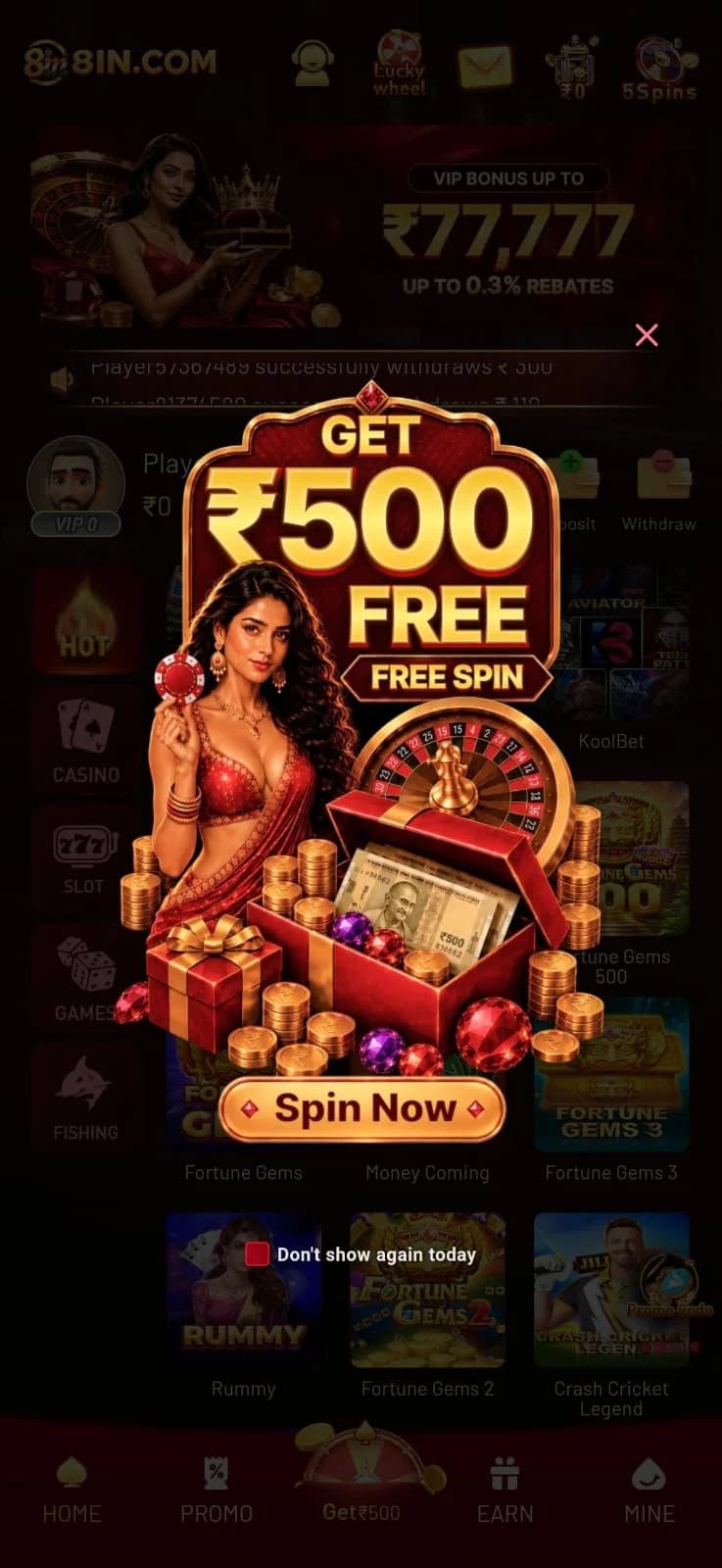
- Get ₹500 (Center Wheel): An elevated golden wheel icon in the middle of the navigation dock that launches the introductory spin reward modal.
- EARN: Displays the referral and affiliate tracking interface, detailing invitation rewards and commission tiers.
- MINE: Opens the personal account portal, showing player ID, VIP tier, deposit records, withdrawal forms, and security settings. For an overview of wallet operations, visit our 8IN deposit and withdrawal tutorial.
The Lucky Wheel & Get ₹500 Modal
When launching the application, players are frequently greeted by an interactive promotional overlay titled "GET ₹500 FREE SPIN". As seen in the app captures, this feature invites users to spin an animated prize wheel for introductory platform bonuses.
Additionally, the top right of the status bar provides access to the Lucky Wheel and 5Spins daily challenges. These mini-games reward regular daily logins. Always keep in mind that promotional rewards are subject to platform rollover guidelines before they become withdrawable cash, as noted in our terms of use breakdown.
Hardware Requirements & Performance Tips
To ensure smooth animations in demanding games like Aviator and live dealer video streams from Evolution, your device should satisfy these recommended parameters:
- Android OS: Version 7.0 (Nougat) or newer with at least 2GB of RAM.
- iOS: iOS 13.0 or higher running on Safari.
- Internet Speed: A 4G/5G mobile connection or stable Wi-Fi with minimum 3 Mbps download speed.
- Browser Settings: Hardware acceleration enabled in Chrome or Brave mobile settings.
If you experience stuttering during intensive game rounds, visit our diagnostic advice in the 8IN troubleshooting guide.
Managing Account & Wallet on Mobile
Managing your player balance on a mobile device is intuitive. From the top balance card, tapping Deposit (+) redirects you to local UPI payment gateways where you can approve transactions through PhonePe, Google Pay, or Paytm in seconds. Tapping Withdraw (-) opens the bank payout submission form.
New players should complete their registration using our 8IN registration tutorial, followed by signing in via our 8IN login instructions. For an end-to-end breakdown of payment workflows, read our 8IN deposit and withdrawal guide.
Troubleshooting Mobile App & Browser Glitches
Occasional technical issues can happen on mobile devices. Here are quick remedies for the most frequent mobile glitches:
- APK "App Not Installed" Error: Ensure your phone has at least 200MB of free space and that "Install unknown apps" permission is granted for your browser in Android settings.
- Blank White Screen on Launch: Clear browser cookies and cache or relaunch the app after closing background tasks.
- Payment Redirect Failing: Temporarily disable aggressive third-party ad blockers or VPNs that can interfere with domestic UPI payment handshakes.
For more exhaustive troubleshooting coverage, consult our 8IN help and troubleshooting guide or read our transparent editorial overview.
Final Thoughts on 8IN Mobile Usability
The 8IN mobile interface delivers an engaging, responsive, and tailored experience for Indian players. With dedicated category drawers, swift wallet shortcuts, and smooth title rendering, 8IN stands out as a reliable mobile gaming destination. To explore the platform yourself, review our complete 8IN platform guide and follow our advice on safe and responsible gaming.
Experience 8IN on Mobile or Web Today
Join the platform to access certified games like Aviator and Fortune Gems, claim your welcome spin, and enjoy instant UPI deposits in Indian Rupees.
Questions About 8IN App Guide
Fact-checked answers based on official platform features.
Related 8IN Guides
Complete 8IN Guide: Platform, Games, App and Account Setup
A comprehensive, fact-checked overview of 8IN. Explore the platform interface, supported game categories, mobile app options, account registration steps, and wallet management.
8IN Games Guide: How the Platform and Game Categories Work
Explore the 8IN gaming library in detail. Learn about crash games like Aviator, JILI slot series, Evolution live casino rooms, traditional Rummy, and mobile game lobby navigation.
How to Register and Login to 8IN: Step-by-Step Walkthrough
A complete walkthrough on creating an 8IN account and logging in securely. Learn required fields, OTP verification steps, password recovery, and account protection tips.